



Did You Hire an AI Assistant—or Give Yourself Another Job?
Explaining context, comparing answers, checking results and moving outputs all take time. Include that coordination when deciding whether an AI assistant helps.

Concept illustration: more answers in more windows still leave someone responsible for finishing the work.
A TikTok caption by @thatlev is easy to laugh at. He wanted a second model to double-check an answer. Several AIs then disagreed, and he spent an hour comparing them while the project remained unfinished.
Five AI chats open, one unfinished project, and another evening telling himself he was nearly done.
If you have copied one model’s answer into another and pasted the suggested changes back again, you may recognize the exhaustion. Every assistant is diligently answering. You are still responsible for keeping the work moving.
Handing work over takes preparation
Meanwhile, a Muse test published by The New York Times starts with an everyday task: a reporter asks an AI agent to get lunch.
From checking an answer to ordering a meal, the hope is to hand something over and receive a result later. Once real information and actions are involved, preparation and checking come with it.
There is still plenty of human work between “It can do this” and “I can delegate this.”
You gather sources, explain context, compare answers, check results, and move the output back to where colleagues actually work. Each step may be simple. Together, they can become another management job.
When a task spans several systems, people easily become the transfer point: copying meeting notes, adding customer details, explaining where the last run stopped, and finally pasting the answer into group chat.
That resembles @thatlev’s experience. More tools are available, while coordinating them still falls to the user.
Count the whole task when measuring time saved
Looking only at answer-generation time leaves out work on both sides. Finding sources, adding context, formatting, checking references and forwarding results all take time.
One way to assess an AI assistant is to ask how much coordination a person still has to do to complete the same task.
Include preparation before execution and handling after the result returns.
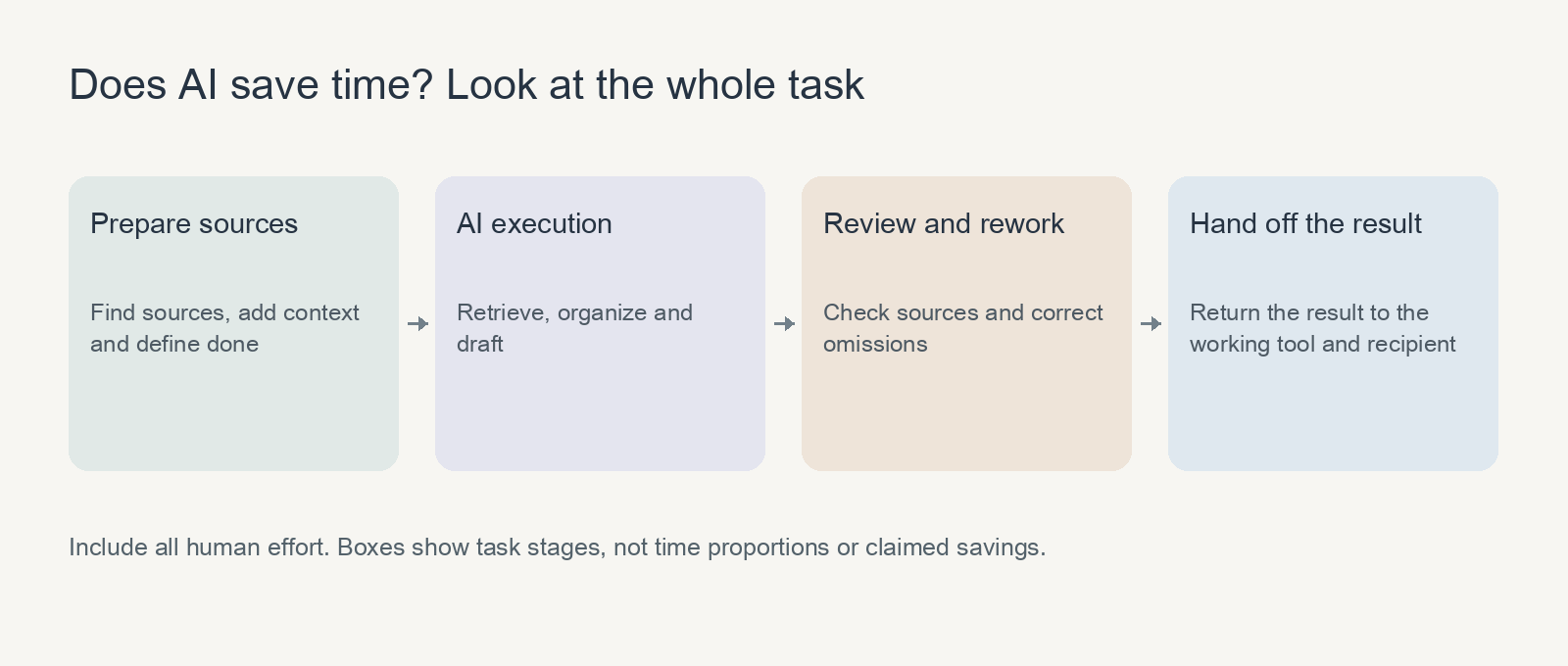
Count the work before and after execution. Box widths do not represent measured time proportions.
Fast output is welcome. An assistant becomes more worth keeping when, over repeated tasks, it needs fewer explanations and produces results that are easier to check.
A second model can still be useful. What matters is having a clear purpose for asking. Checking a fact or looking for omissions is more likely to produce something actionable than another “What do you think?” If a question can be tested directly, try that first, rather than turning conflicting suggestions into more material to manage.
Start with work you keep explaining again
If you introduce the same project every time, or rewrite similar instructions each week, start there. When information comes from several systems, consider which searches and organization the assistant could handle.
Leina brings these pieces into everyday team chat: Memory retains work context, Apps connect authorized information and actions, and Skills preserve reusable methods. A team can build a working relationship around one concrete task.
Reduce back-and-forth by stating the source scope, delivery format and completion criteria together:
Using this week’s project meeting notes and task list, prepare a progress summary suitable for the project group. Include only completed work, ongoing blockers and next steps already agreed in the records, with sources. Mark missing owners or dates as needing confirmation; do not invent them. Return a draft here first.
That is easier to check than asking several windows to “analyze the project”: are items missing, are statuses correct, and are next steps supported? After checking a few runs, save the stable requirements.
Next time, there is less to explain and the review is more focused. Customers and dates can change while a proven method remains useful.
Look for everyday evidence: did you explain the background one fewer time this week, copy fewer documents, or receive something closer to what you needed?
Has your working day become easier?
To see whether an assistant suits you, repeat a recurring task a few times and track preparation, checking, rework and handoff time.
No elaborate analysis is necessary. For three runs, record two numbers: your total time invested and the number of times the result needed revision. Choose tasks of similar scope, then see whether your effort drops. If AI writes faster but leaves you more to fix, the approach still needs adjustment.
When that time starts falling, you have a reason to delegate more similar work. If most of it still goes on explanations and corrections, the gap becomes clearer: missing sources, unclear requirements, or a task that is not yet suitable for delegation.
One detail in @thatlev’s caption stands out: he could have tested the question himself. Comparing round after round of advice consumed the time instead.
A good assistant should make finishing easier. If, after using it for a while, you can close a few windows earlier and the work has moved forward, that is a meaningful improvement.
Create a Leina and start with something you repeat every week. The first AI teammate guide covers morning briefs, customer follow-ups and weekly reports. Try the one closest to your daily work.

Give Leina Your Next Task
Start with an everyday task. Assign it in team chat and get the results there.
Create Your LeinaNew users can claim a 3-day free trial
Browse Supported Integrations