



How to Turn a Working AI Task Into a Reusable Skill
Transform a one-off prompt into a reusable SKILL.md. Separate dynamic inputs from standard rules, test edge cases, and share the workflow with your team.
Once you have a GitHub weekly report you can use, you probably want the next one to follow the same rules: filter by merge date, keep source links, and leave missing context visible. Saving those rules makes them easier to reuse and review than copying a long conversation each week.
In Leina, you can package proven workflows into a Skill—a structured SKILL.md file following the open Agent Skills specification. Instead of re-explaining your team’s reporting standards every Monday, supply the current repository, dates, timezone, and any destination the task needs.
Use a report you have already checked as the starting point. The GitHub-to-Notion walkthrough shows how to prepare and review one.
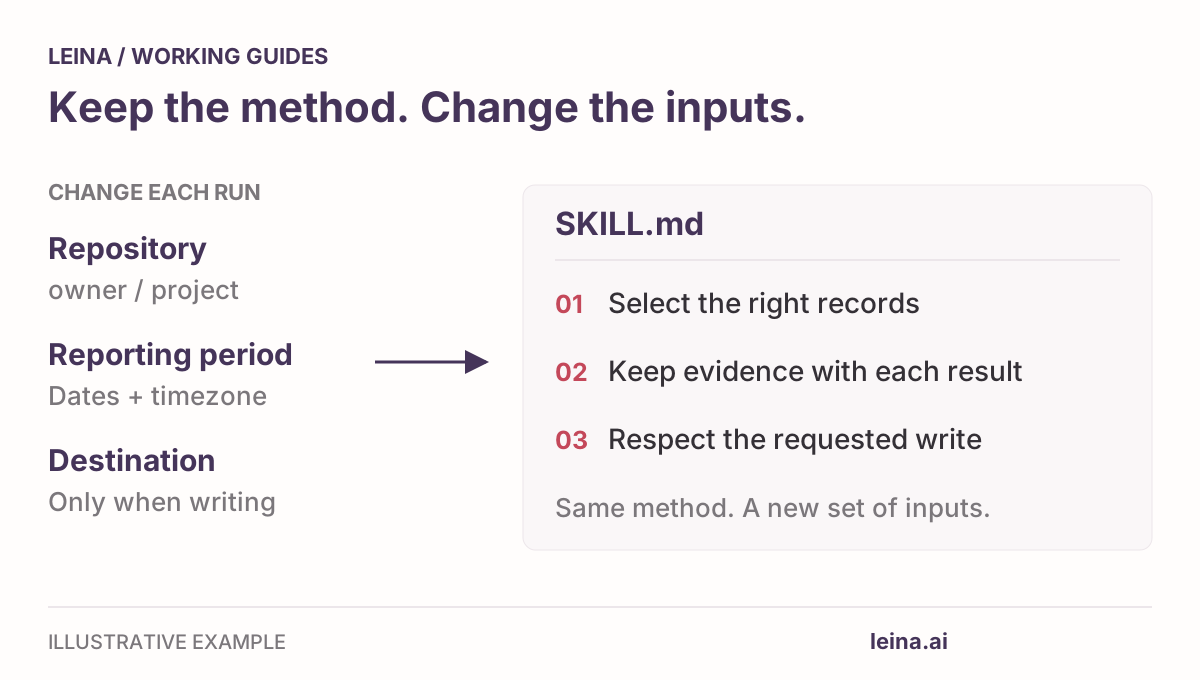
Separate changing inputs from standard rules
A reliable Skill separates inputs for this run from rules to reuse.
| Inputs for this run | Rules saved in SKILL.md |
|---|---|
| Target repository or repository list | Exact filter rules (merged timestamp vs. closed date) |
| Reporting window and timezone | Source citation requirement (include PR link and author) |
| Notion destination page URL, for a write | Evidence rules (flag missing context as undocumented) |
| Intended audience / detail level | Write instructions (respect the requested scope and check existing content) |
Credentials and access tokens never belong in a Skill file. Leina manages access through authorized Connections; a Skill simply defines how the agent should use the tools available in your environment.
Structure your SKILL.md file
A SKILL.md file has YAML frontmatter and Markdown instructions. This starter is an example to adapt and test with your available tools; it has not been run against your accounts.
---
name: weekly-pr-report
description: Prepare a source-linked weekly GitHub pull-request report for a specified repository and time window, with an optional authorized write to Notion. Use for engineering status reports, not code review or individual productivity scoring.
---

# Weekly PR report

Example instructions to adapt and evaluate with the tools available in the agent's environment. This file does not install connectors or grant account access.

## Inputs

Resolve the repository list, reporting window with timezone, and intended readers from the request. Ask for missing scope that would change the report. For a Notion write, also resolve the exact page, report heading, and whether the user wants an append or a replacement.

Use authorized GitHub reads exposed by the current environment. If those operations are unavailable, report the missing capability. Never invent connector action IDs or retrieved records.

## Select and summarize

- Include merged PRs whose merge timestamps fall inside the requested window. Distinguish closed-unmerged records from merged work.
- Include a separate current-open-PR snapshot only if requested, labelled with retrieval time. Do not present current state as historical state.
- Retrieve all result pages within scope where supported. Disclose unavailable records, truncated results, or failed queries; an incomplete query is not a zero-result query.
- Keep the PR URL, number, title, author, state, and relevant timestamp. Summarize from the PR description and changes available to the tool.
- Describe impact, deployment, blockers, and next-action owners only when evidence supports them. Do not treat the author as the next-action owner by default.
- Return the selected scope, report sections, source links, and unresolved questions. Match the detail level to the intended readers.

## Optional Notion write

A draft request returns a draft. Write only when the user has authorized the concrete destination and operation; preserve existing authorization rather than requiring repeated confirmation.

Check for the report heading before appending. If a report already exists and replacement is not authorized, return its location and ask how to proceed. Preserve unrelated content.

After a write, read back the section if supported and return its location. If the write outcome is uncertain, inspect the target before retrying. If verification is unavailable, report that limitation rather than claiming the write was confirmed.
Download the same weekly-pr-report SKILL.md to customize it for your team’s fields.
Three choices in the file are worth keeping:
- A focused description: It states when the Skill is useful. Discovery and invocation depend on the agent environment.
- Explicit selection rules: Merge time determines which PRs belong in the completed-work section.
- A defined write scope: The instructions ask the agent to check existing content and respect the requested operation. They guide behavior; permissions enforce access.
Test edge cases before rolling it out
Before sharing the Skill with your team, run it against a different week or repository and compare its output with the source records. Try these cases:
| Test scenario | Expected agent behavior |
|---|---|
| A quiet week with 0 merged PRs | Reports zero after a complete query; does not invent highlights or pull older PRs. |
| A PR merged 1 minute outside the window | Excluded from the merged section. |
| A closed, unmerged PR | Excluded from merged work. |
| A PR with no description (e.g. “bump version”) | Summarizes the raw change and explicitly flags impact as undocumented. |
| Target heading already exists in Notion | Checks the existing section and follows the authorized operation; asks how to proceed if replacement was not authorized. |
| Inaccessible repository or page | Reports the missing permission clearly rather than pretending the repo is empty. |
If the agent repeats an old date on the second run, make sure the date range isn’t hard-coded in the instructions. If it hallucinates customer impact, tighten the summarization rule.
Share and automate with your team
After checking a second run, follow the installation instructions for your Skill package or the import mechanism supported by your agent environment. Downloading the file alone does not install it. See Use Skills With Leina for the directory workflow.
- Interactive use: Teammates can invoke it naturally in chat: “@Leina run weekly-pr-report for backend/api covering September 28 through October 4, 2026, in America/Los_Angeles. Return a draft here.”
- Permissions: Each teammate needs permission to use the GitHub connection, plus the Notion connection when saving a report. Check those accounts in Connections.
- Scheduled runs: Request a recurring task with its timezone, reporting window, and delivery location. Verify the schedule Leina sets up and review its first scheduled output. Saving the Skill does not create a schedule.
Share the checked file with its required Apps, a sample report, and a version or revision date. When the team changes the reporting rules, update that file and check another run.